Your first script
Create or select a project in the Script tab, paste this example, and choose Run:
MoveTo(39.9042, 116.4074);
MoveUp(10);
MoveRight(10);
MoveDown(10);
MoveLeft(10);
MoveTo establishes the starting coordinate. Every relative movement function in the same run
uses the result of the previous command. Wormhole sends commands to the selected device one at a time.
Always call MoveTo first before using a relative movement function.
Location API
| Function | Effect |
|---|---|
MoveTo(latitude, longitude) | Sets the absolute starting coordinate. |
MoveUp(meters) | Moves north by the requested distance. |
MoveDown(meters) | Moves south by the requested distance. |
MoveLeft(meters) | Moves west by the requested distance. |
MoveRight(meters) | Moves east by the requested distance. |
Move(northMeters, eastMeters) | Moves both axes in one command. Negative values move south or west. |
Coordinates and distances must be finite numbers. Latitude must be between −90 and 90, and longitude between −180 and 180. For compatibility with saved scripts, an omitted function argument is treated as zero.
Use normal JavaScript logic
This example combines an array, a loop, a function, and Math:
function moveEastInSteps(distances) {
  for (const meters of distances) {
    MoveRight(Math.max(1, meters));
  }
}

MoveTo(39.9042, 116.4074);
moveEastInSteps([2, 3, 5]);
Move(-4, 6);
Standard language features such as Map, Set, Date,
RegExp, JSON, and Math are available.
Create and save a project
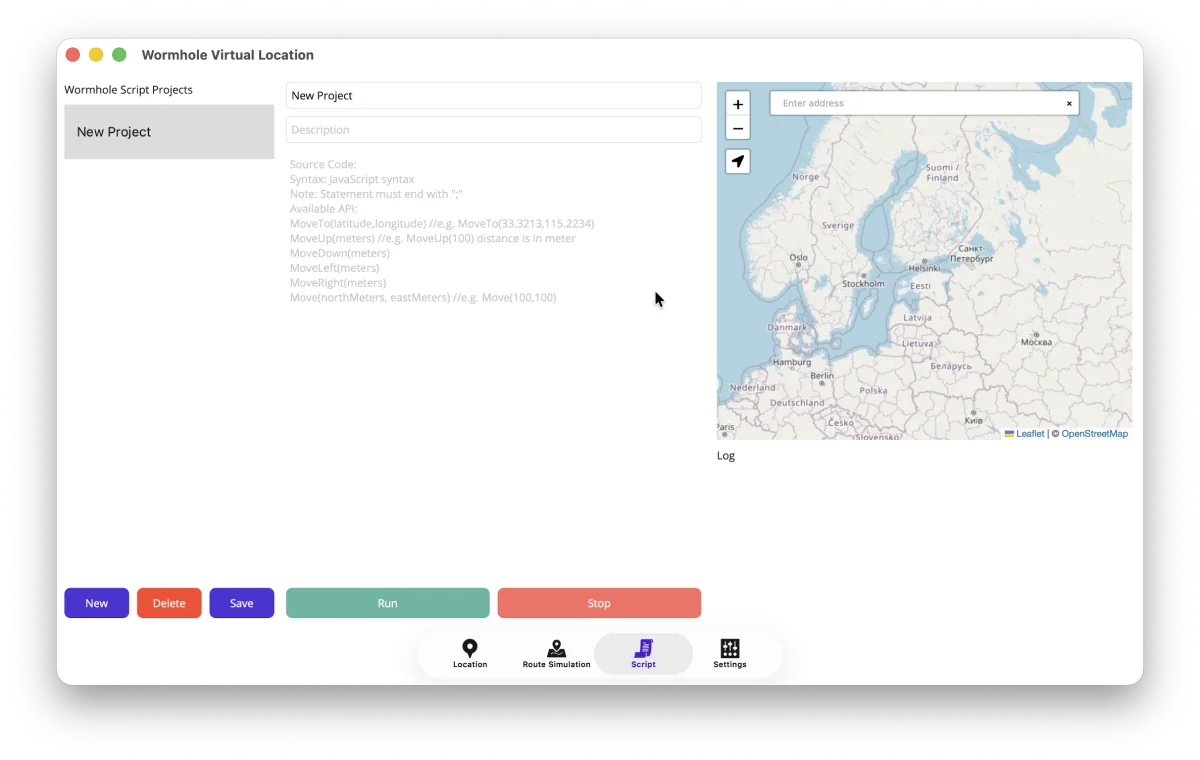
- Open the Script tab and choose New.
- Enter a project name and optional description.
- Write or paste the source code.
- Choose Save to keep the project.
- Select the intended device, then choose Run.
Stop a script safely
Choose Stop to cancel a running script. Cancellation interrupts both long-running JavaScript and the delay between device movements. The app also applies execution, statement, memory, and recursion limits so faulty scripts cannot run without bounds.
// This loop is intentionally endless for a cancellation test.
// Run it only when you are ready to press Stop.
while (true) {
  // Wormhole will interrupt this safely.
}
What the sandbox does not expose
Wormhole Script is JavaScript control logic, not unrestricted access to your computer. It does not expose:
- .NET or other CLR objects and reflection.
- Files, folders, environment variables, or processes.
- Network requests, sockets, or browser objects.
- Node.js modules such as
requireorprocess. - Browser timers such as
setTimeout.
This boundary is the same on Mac and Windows and keeps scripts compatible with the Mac App Store sandbox.
Common errors
| Message or symptom | What to check |
|---|---|
| “Please call MoveTo first” | Add MoveTo(latitude, longitude) before relative movement. |
| Coordinate range error | Check latitude, longitude, and decimal separators. |
| Syntax error | Check brackets, quotes, commas, and function spelling. |
| No device selected | Return to Location, refresh the device list, and select the USB-connected device. |
| Script stopped | The Stop button, page navigation, or an execution safety limit cancelled the run. |
After a script test, stop the run and use Restore on the Location tab.